 Saveliny
Receipt scanner app Scan the receipt –
expense tracked.
Snap the receipt: Saveliny finds total, merchant and date, picks the category and saves the expense. The receipt is read right on your phone.


- Data stays on your phone
- No subscription
- No account, no cloud
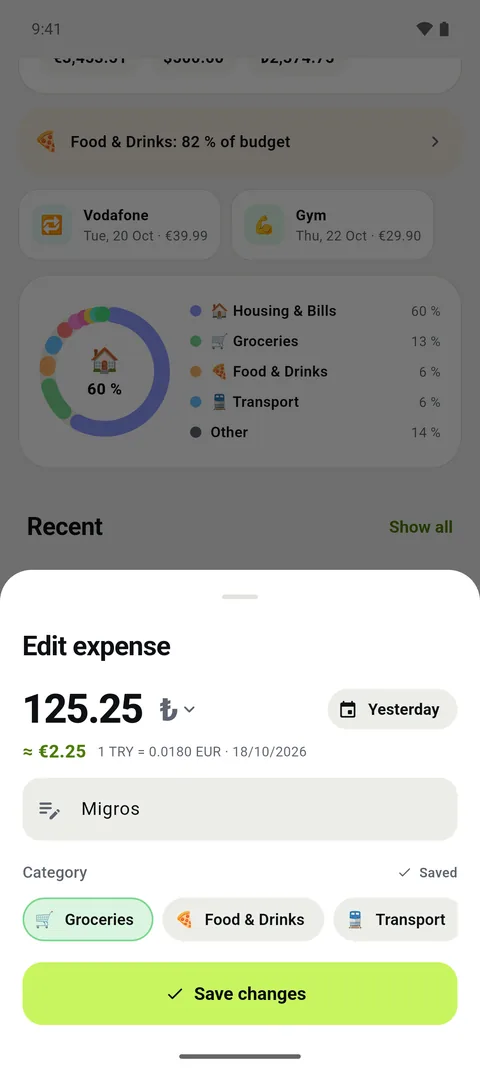
How receipt scanning works
Tap the scan button in Saveliny and point the camera at the receipt. The app detects the edges of the receipt and reads the text.
You instantly see amount, merchant, date and category and can change anything before saving.
Travel receipts in your currency
A receipt in lira, dollars or złoty? Saveliny converts foreign currencies at current exchange rates into your currency and keeps the original amount.
No upload, no cloud
Text recognition runs on your device. Your receipt is not uploaded to our server – we don’t have one for your data. No account needed either.
More than a receipt scanner
Every scanned receipt goes straight into your overview: monthly budget, statistics and balance. Expenses without a receipt? Just say them.
Try it free for 7 days
Try every feature for free, then unlock it once. No subscription, no auto-renewal.
- Total, merchant and date automatically
- Foreign currencies at current rates
- Text recognition on your phone
- Straight into budget and statistics
Frequently asked questions
Which receipts can Saveliny read?
Printed receipts and invoices from supermarkets, restaurants, gas stations or pharmacies. If a value is unclear, you fill it in before saving.
Are my receipts uploaded?
No. The text is recognised on your phone. Saveliny has no account and no server for your data.
Can I scan receipts from other countries?
Yes. Saveliny converts foreign currencies at current rates into your currency.